
Special KVM Setup on Debian Lenny.
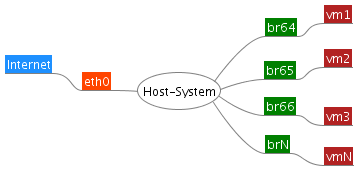
[Hide]
1 Introduction
1.1 Characteristics
1.2 Requirements
2 Host System
2.1 Network Configuration
2.1.1 IP Addresses
2.1.2 /etc/network/interfaces
2.2 DHCP Server for Virtual Machines
2.2.1 /etc/default/dhcp3-server
2.3 Firewall
3 Virtual Machines
3.1 Setting Up a Virtual Machine
3.2 Network Configuration
3.2.1 By DHCP
3.2.2 static
4 Obstacles and Pitfalls
5 Alternative Method for Firewall Script
Introduction
After reading these instructions, some people might say in an exasperated tone: “This is much too complicated for me”.
IMPORTANT: To avoid frustration and disappointment please: Read through the introduction completely before you turn your server upside down – then at least you will know what to expect.
Further instructions on the subject of KVM can be found in Virtualisation.
As with all instructions found on the Internet, the same applies here: Use the instructions at your own risk.
Characteristics
These instructions are for those system administrators who wish to use KVM on Hetzner servers under the following constraints:
- NAT does not take place
- each virtual machine has at least one public IP address
- the physical machine routes the traffic
- Routing of the traffic between individual VMs
- Routing of the traffic between VMs and the Internet
- hence no Proxy ARP is required either
- as we are routing and not switching, iptables can be used on the Host system
- main firewall rules on the Host instead of in each individual Guest
Firewall rules for traffic between the VMs is possible
- IP addresses do not get “lost”
the network and broadcast addresses for the additional single IP nets can be used
no IP address disappears as a result of an IP having to serve as gateway for the additional net
all IP addresses of the additional IP net really can be used
the use of libvirt for network configuration is waived
in these instructions, libvirt only manages the Guests, no nets
Debian Lenny is used as the operating system on the Host