
Setting up a Tor service
Tor services use a specific URL structure. In the clear net we’re used to seeing Top-Level Domains (TLDs) such as .com, .net, and a myriad of others. A TLD that does not exist in the clear net is .onion and, conversely, it is the only TLD that exists in the Tor network. Meaning, if you try to connect to a Tor service such as Facebook’s Tor site at https://www.facebookcorewwwi.onion without being connected to Tor, you will not be able to. Because of this naming convention, some people refer to Tor services as onion sites
.
Security considerations during setup
We’re now going to set up a Tor service using a cheap Linux VPS. Here’s the first lesson in OpSec: because I am not interested in the Silk Road Model, I am just purchasing a VPS from a cloud provider which will forever associate me in some way to this server. You should use a server that reflects your level of concern about being associated to it.
Another consideration is that connecting to this server with your ISP IP address will associate you with this service. If that is a concern for you, there are two main ways around this. If you have some other suitable method to connect to this system without using SSH you can set up your Tor services using that method and never have to worry about it. But, if you have no way to connect to this server other than SSH, you can use the SOCKS5 proxy provided by the Tor Browser to route your SSH traffic through. Either method should prevent your ISP IP address from becoming associated with this server.
SSH using Tor proxy
If you’re using PuTTY, you can configure that in the Proxy pane:
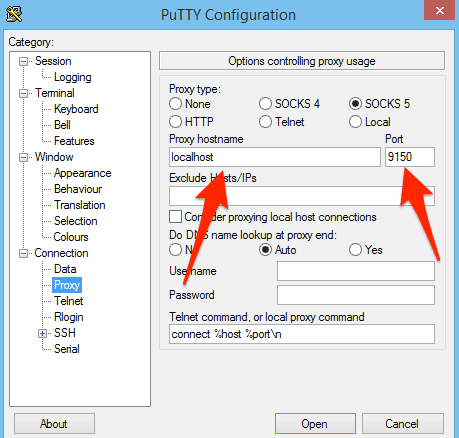
Using Linux or macOS, you can use SSH with the ProxyCommand argument using the correct $SERVERIP and $USERNAME for your server. Using an IP instead of any hostname you may have created should prevent DNS leaks:
$ ssh $SERVERIP -l $USERNAME -o ProxyCommand="nc -X 5 -x localhost:9150 %h %p"
I see this in the server logs:
Feb 5 16:34:34 host-172-20-0-101 sshd[11269]: Accepted password for $USERNAME from 65.19.167.131 port 22323 ssh2
And we can consult the Tor Atlas to confirm that 65.19.167.131 IP is a Tor exit node in the US, so everything looks good.
Once Tor is installed on the server, you can also decide to set up an SSH Tor service and then connect using the .onion name for your service. That command looks like this and since Tor proxies requests, the localhost IP is seen in the SSH logs.
$ ssh $YOURSERVICENAME.onion -l $USERID -o ProxyCommand="nc -X 5 -x localhost:9150 %h %p" $USERID@$YOURSERVICENAME.onion's password: Last login: Sun Feb 5 20:47:10 2017 from 127.0.0.1
Note: If you are using an alternative to PuTTY, look up their documentation for achieving the same result.
Installing Tor
Add the Tor repository to your installation sources. Tor may be available in your distributions repos, but it could fall out of date. It’s probably best to create a repo file such as /etc/yum.repos.d/tor.repo with the actual Tor project repo using following entries:
[tor] name=Tor repo enabled=1 baseurl=https://deb.torproject.org/torproject.org/rpm/el/6/$basearch/ gpgcheck=1 gpgkey=https://deb.torproject.org/torproject.org/rpm/RPM-GPG-KEY-torproject.org.asc
Then install Tor:
sudo yum install tor
You can find Debian and Ubuntu packages in the https://deb.torproject.org/torproject.org/dists/ directory; update the configuration above as necessary for your distribution.
Take a look at the /etc/tor/torrc file. The bare minimum you’ll need enabled in that file is the following:
RunAsDaemon 1 DataDirectory /var/lib/tor
You may also wish to route your DNS queries through Tor. This will force all your DNS through Tor by adding this to your torrc fle (use some value for VirtualAddrNetworkIPv4 that makes sense on your server):
VirtualAddrNetworkIPv4 10.192.0.0/10 AutomapHostsOnResolve 1 TransPort 9040 TransListenAddress 127.0.0.1 DNSPort 53
To make that work, you will also have to tell your server to resolve DNS on the localhost. That can be done by modifying the /etc/resolv.conf to tell your system to resolve using the localhost instead of whatever nameservers it is configured for now.
nameserver 127.0.0.1
Then restart your resolver:
sudo service network restart
There is more information on DNS and proxying in general on the Tor Project page here.
Prepping the actual service (web, SSH)
A Tor service can be literally any type of service that you’d see running on the clear net. I am going to use a web server as an example, utilizing the sleek Nginx (pronounced Engine X
) web server. Tor will run in front of Nginx and proxy all requests. I am using CentOS for these instructions so most of these commands will work for any Red Hat based distro. You can use apt get instead of yum on Debian-based systems such as Ubuntu, and the files I mention may be in slightly different locations.
Install Nginx using your distribution’s package manager.
sudo yum install nginx
Recall that Tor is going to proxy requests for the web server. This means that Nginx should only listen on the localhost ports. If Nginx also listens on the network interfaces attached to the Internet, then you run the risk of your hidden service being available on the clear net. To bind Nginx to the localhost only, find the default.conf file and update the default server stanza. In RPM-based distros, the default configuration file is usually here:
sudo vi /etc/nginx/conf.d/default.conf
Add localhost to the default listen directive so it looks like this:
listen localhost:80 default_server; server_name _; root /usr/share/nginx/html;
Restart Nginx:
sudo serice nginx restart
Test both the localhost port 80 and the internet accessible port 80. On the server itself:
# curl -IL localhost HTTP/1.1 200 OK Server: nginx/1.10.2 Date: Sun, 05 Feb 2017 20:13:33 GMT Content-Type: text/html Content-Length: 3698 Last-Modified: Mon, 31 Oct 2016 12:37:31 GMT Connection: keep-alive ETag: "58173b0b-e72" Accept-Ranges: bytes
Off the server:
$ curl -IL 170.75.162.213 curl: (7) Failed to connect to 170.75.162.213 port 80: Connection refused
Notwithstanding that there may be some information leakage in those headers that should be dealt with, the connection setup looks good. More on headers in the OpSec section later.
The next step is to tell Tor to listen for traffic on the external network interface on port 80 and then proxy that traffic to your local Nginx installation.
sudo vim /etc/tor/torrc
Add the following lines at the end. The format of the HiddenServicePort directive is the port you want Tor to accept connections on, and then the IP:PORT to proxy the request to. In this case, we want Tor to listen on the standard HTTP port 80 and then proxy back to our Nginx instance on port 80 on the localhost. You can infer from this that you can also proxy separate back ends and not just local services with Tor.
HiddenServiceDir /var/lib/tor/http_hs/ HiddenServicePort 80 127.0.0.1:80
Restart tor:
sudo service tor restart
To find out the name of your new HTTP Tor service, look in the hostname file of the HiddenServiceDir specified in the torrc file. This is the actual HTTP service name generated for this article, but it likely will no longer work at time of publication:
cat /var/lib/tor/http_hs/hostname
zhsluuuvqvstkzey.onion
In 10 minutes or so, that will work on Tor and you’ll be able to bring it up in the Tor browser.
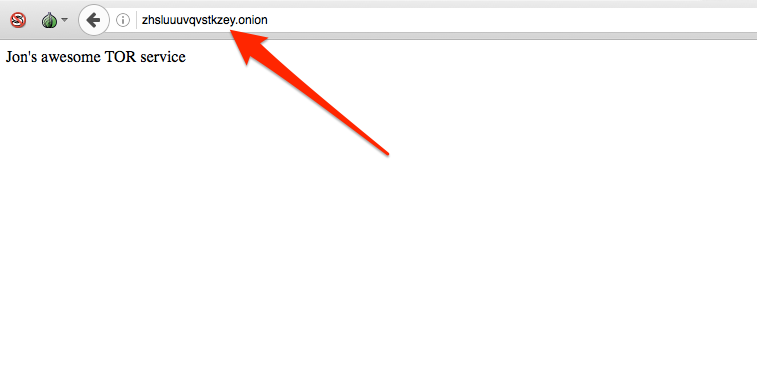
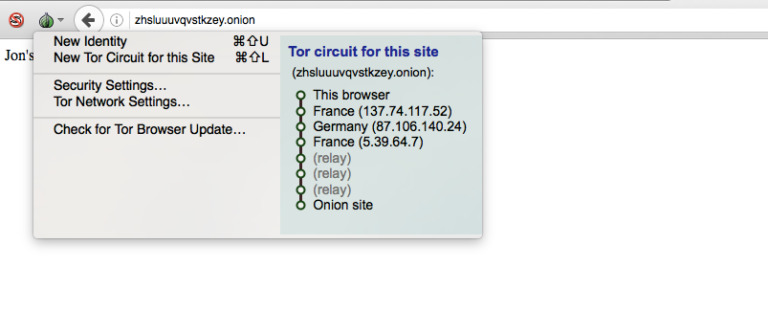
Note the different Tor circuit that an onion service uses. It doesn’t exit Tor to the Internet as the earlier example of using Tor to reach the Comparitech site did. This is because .onion sites only reside inside
Tor.
You can now add more services such as a Tor SSH service or anything else. Just install the service you want to use, and then add the two HiddenService directive to your torrc and restart Tor.
sudo vim /etc/tor/torrc
HiddenServiceDir /var/lib/tor/ssh_hs/ HiddenServicePort 22 127.0.0.1:22
Restart Tor to generate the service keys and name:
sudo service tor restart sudo cat /var/lib/tor/ssh_hs/hostname oxxcatqaha6axbcw.onion
SSH in from some other machine using your onion name:
ssh oxxcatqaha6axbcw.onion -l $USERID -o ProxyCommand="nc -X 5 -x localhost:9150 %h %p"
[email protected]'s password: Last login: Sun Feb 5 20:53:20 2017 from 127.0.0.1
Once you have confirmed you can SSH using the onion name, it’s a good time to shut SSH off from the clear net. Uncomment this line in your /etc/ssh/sshd_config file:
#ListenAddress 0.0.0.0
And change it to read:
ListenAddress 127.0.0.1
And restart SSH:
sudo service ssh restart
Keep your hidden service hidden (OpSec)
Operational Security (OpSec) is the concept that collecting easily available, and seemingly unrelated, information can generate some very specific information. Tor itself is extremely good at anonymizing traffic, but humans are terrible at OpSec. Because of that, many people who have used Tor for evil have been successfully identified.
The highest profile Tor case is likely the Silk Road black market Tor site. The administrators of both generations of that site were arrested as well as some vendors. While the fine details will probably never be fully known, in most cases anonymity is being broken by sloppy OpSec rather than a weakness in Tor itself. However, there are cases where the Tor network itself may have been compromised.
There are reports that adversaries of Tor are operating Tor nodes. The idea being that if an adversary operated enough relay and exit nodes then large-scale traffic analysis could be performed to identify individual users. The FBI Operation Onymous that took down Silk Road 2.0 as well as 400 other sites was likely running Tor nodes as part of its investigative data collection. A number of Tor relays that were modified to change headers to reveal traffic flow information appeared in the Tor network leading up to the arrests. It’s also been noted that 129 of the 400 sites were hosted by a single web hosting provider. This may mean that hosting provider has poor OpSec, or it may mean it cooperated with law enforcement by providing internal server information not available to normal Tor users.
Whatever the case, if you want to remain disassociated from your Tor hidden service, you have a very large task ahead of you. The budget and determination of your adversary will quite likely be the determining factor of success rather than any steps you personally take. But, that’s no reason to be sloppy. Ben Tasker has written a thoughtful piece on Tor OpSec which bears reading. Here are some of the things that you should review to ensure you’re not leaking information that can be used to identify you.
Technical OpSec
Security is best performed in layers; there is no silver bullet one size fits all
security model. We see this in the Tor architecture in that no single node has enough information to compromise a user. Likewise, when setting up your Tor server and services, you should not trust them to be configured with your particular use case in mind.
Firewall
We configured our two sample Tor services to listen only on the localhost interface. This should be enough to prevent them from being available in the clear net. But, things can happen that are out of your control so it makes sense to add a layer of security and firewall off the entire server on all ports. This will prevent your services from suddenly becoming available on the clear net due to a errant upgrade or human error.
Application headers
There are two reasons to eliminate as many headers as possible in all your services. First, they may actually divulge information about your system that can help identify where it is. Second, even if they don’t divulge specific information like that, all data can be used in an attempt to fingerprint a server and later correlate it to some other, known, server to identify it.
You can remove the Nginx version string by using the server_tokens directive in server, location, or http section of your Nginx configuration file.
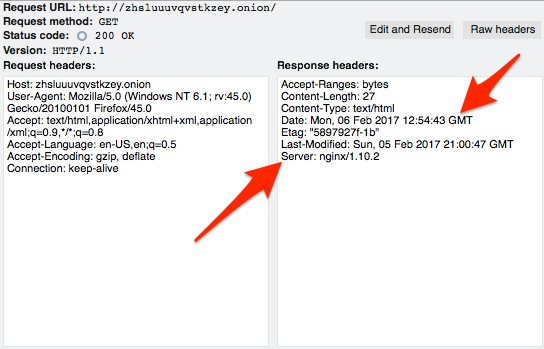
You can go farther with Nginx by using the Headers More module. With it, you can set or remove a wider variety of headers.
SSH
A special consideration with SSH is the server identification fingerprint. When you first connect to an SSH server, you are notified that your system can’t confirm the identity of the remote system, presented with the key fingerprint of the server, and asked what you want to do. Most of us accept it and then the public key of the server is stored in our known_hosts file. Subsequent attempts to connect to that service do not prompt us any more:
$ ssh oxxcatqaha6axbcw.onion -l $USERID -o ProxyCommand="nc -X 5 -x localhost:9150 %h %p" The authenticity of host 'oxxcatqaha6axbcw.onion (<no hostip for proxy command>)' can't be established. RSA key fingerprint is SHA256:FroAZ5QibIdWgYyCajY3BxMQjR5XGQFwS1alTOarmQc. Are you sure you want to continue connecting (yes/no)? yes Warning: Permanently added 'oxxcatqaha6axbcw.onion' (RSA) to the list of known hosts. [email protected]'s password:
This line is added to my know_hosts file:
oxxcatqaha6axbcw.onion ssh-rsa AAAAB3NzaC1yc2EAAAABIwAAAQEArIR0Jn5fhY7kQxb37jBC1+hRFZlxjrs4YsWf4DVJjjY7dlVzhN5mEnmBZMsNSLbr9B3Fzk

8ukJp9BysAp0GbPDYT2egCggHfX79806KSMBIuUiU+g6AsxsyZPjv8t2xRc7KBfqaDL2BVqOy1bnxUva1AsPHeRG/symeTA3

Zo+Qz0YVNMN+fPCS3YA7Bc7u1YbP6KLpwyFs+CEcJdH1mHiGTx2Z0l9q7atj8tAheO7livBpLacP0SPseQqkEfJ/GWVUB7cW

KB7S2N1dy1M9im883Lpgp9Xe2doy2vScNwb70tES4zZg08AjSsybLXzSdYTEUqSP6IS0YWBE1dqdlfw==
So, the next time I log in that step is not performed:
$ ssh oxxcatqaha6axbcw.onion -l $USERID -o ProxyCommand="nc -X 5 -x localhost:9150 %h %p" [email protected]'s password: Last login: Mon Feb 6 13:25:50 2017 from 127.0.0.1
The problem with this lies in my known_hosts file. Since I connected to my server earlier using the public IP and my Tor proxy, I already have an entry for that onion fingerprint under a different IP address:
170.75.162.213 ssh-rsa AAAAB3NzaC1yc2EAAAABIwAAAQEArIR0Jn5fhY7kQxb37jBC1+hRFZlxjrs4YsWf4DVJjjY7dlVzhN5mEnmBZMsNSLbr9B3Fzk

8ukJp9BysAp0GbPDYT2egCggHfX79806KSMBIuUiU+g6AsxsyZPjv8t2xRc7KBfqaDL2BVqOy1bnxUva1AsPHeRG/symeTA3

Zo+Qz0YVNMN+fPCS3YA7Bc7u1YbP6KLpwyFs+CEcJdH1mHiGTx2Z0l9q7atj8tAheO7livBpLacP0SPseQqkEfJ/GWVUB7cWK

B7S2N1dy1M9im883Lpgp9Xe2doy2vScNwb70tES4zZg08AjSsybLXzSdYTEUqSP6IS0YWBE1dqdlfw==
This is a pretty powerful correlator. It’s almost certain that the IP address 170.75.162.213 is hosting my Tor service at oxxcatqaha6axbcw.onion based on this information.
These are just two examples of ways in which your service can be fingerprinted for later identification. There’s probably no way to enumerate every possible way your service can be identified but application headers and behaviour are good umbrella topics to review.
Behavioural OpSec
There are non-technical ways that your service may be tied to you as well.
Uptime
Your service can be monitored for uptime. Many Tor services are not hosted in traditional data centers and my only be available sporadically. Correlating uptime cycles may give clues to the operator’s time zone or work schedule.
Account data
There’s little sense in using Tor for anonymity if you access a site and then log in with identifiable information. Ross Ulbricht, convicted as the Dread Pirate Roberts of Silk Road (v 1.0), was momentarily distracted by FBI agents in a library and another FBI agent grabbed his laptop and ran. Ulbricht was logged in to his Silk Road DRP account. Obviously, Ulbricht had already been identified and was set up, but that tiny bit of social engineering allowed the FBI to catch him logged in to the account of the person they were looking for.
Username correlation
Many people use handles or pseudonyms on the internet to hide their real identities. In some cases, they select a handle early on and just tend to stick with it, or at least re-use it from time to time. This is bad OpSec.
While this has nothing to do with Tor specifically, it serves as a good example of how historical account data can be used to identify people. Hillary Clinton’s email administrator Paul Combetta was targeted by Reddit users as the user ‘stonetear’ who was soliciting information about how to modify email recipients around the time the news of Clinton’s private email server surfaced. There is a long and easily traced history of Combetta using that handle so it provided almost no anonymity at all.
As with the technology OpSec concerns, there is probably no limit to the type of behaviour that can be collected and correlated to identify the operator of a Tor service. Your adversary will simply have to run out of ideas and money before you do.